What Is WebMCP and How Do You Make Your Website AI-Agent Ready?
Signal Boost | By Daria Dubois | 2026-02-15T10:00-04:00
TL;DR
WebMCP (Web Model Context Protocol) is a new Google standard that lets websites expose their capabilities — forms, content, data — directly to AI agents as structured tools. Instead of AI bots taking screenshots and guessing where to click, your site tells them exactly what's available. There are two implementation paths: declarative (HTML attributes on forms, takes five minutes) and imperative (JavaScript API for complex interactions like content browsing and navigation). For GEO, this creates a new optimization surface beyond citation: brands become not just referable by AI, but interactive with AI. Implement now to define how agents learn your category. This is live in Chrome 146's Early Preview Program.
What Is WebMCP?
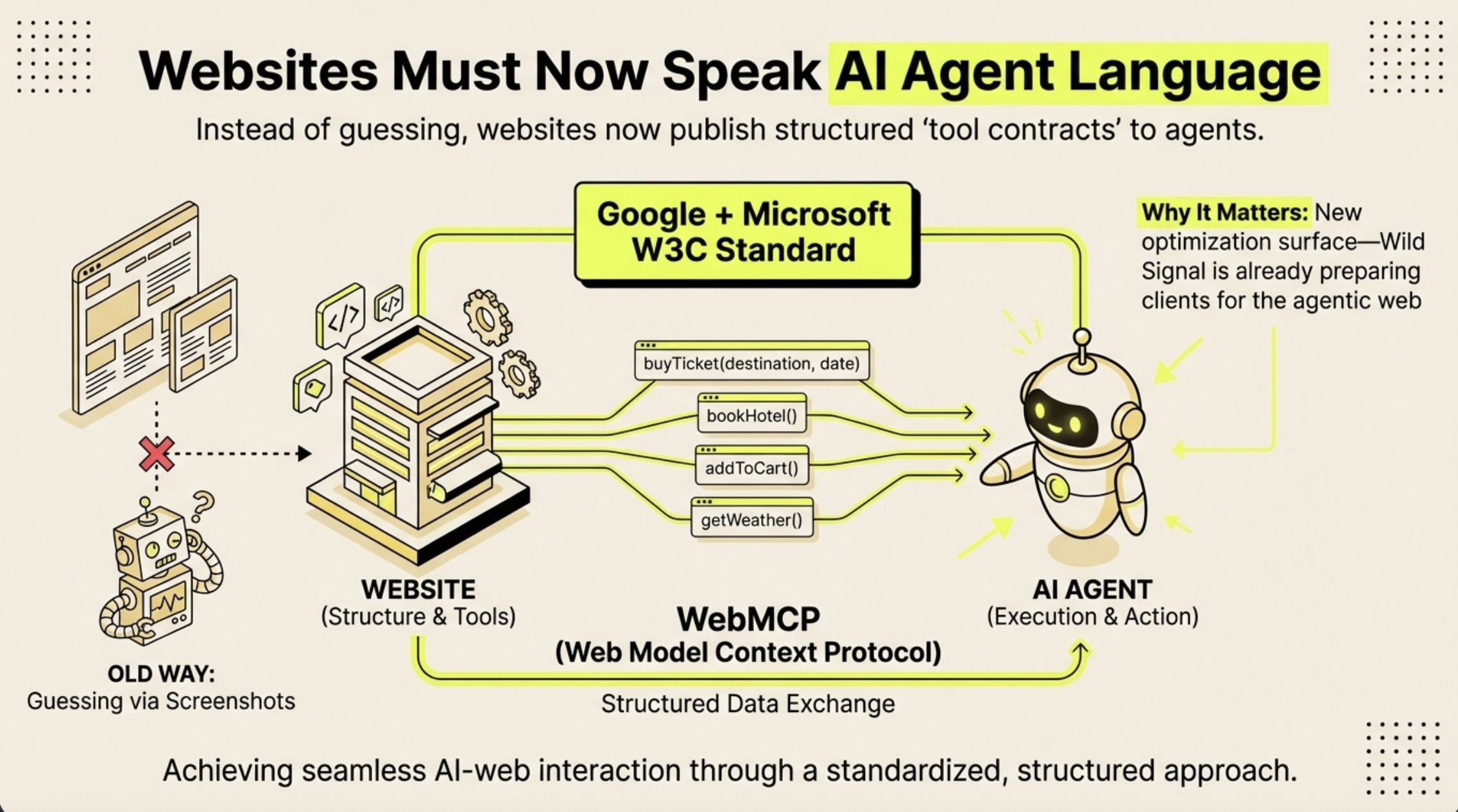
WebMCP stands for Web Model Context Protocol. It is a standard introduced by Google that allows websites to communicate directly with AI agents through structured data rather than visual interpretation.
Until now, AI agents that browse the web have worked by taking screenshots, running them through vision models, and trying to locate interactive elements like buttons and forms. If a button moves five pixels, the agent fails. This approach is slow, expensive, and breaks constantly.
WebMCP replaces this with a structured layer. Your website declares its capabilities — what tools exist, what inputs they accept, what they do — and the browser passes this information directly to the AI agent. The site becomes a toolkit that agents can use programmatically, not a picture they have to interpret.
Google is shipping WebMCP in Chrome 146 through the Early Preview Program (EPP). It is not a proposal or a concept paper. The infrastructure is being built right now.
How Does WebMCP Work?
WebMCP provides two integration paths. They are not mutually exclusive — most sites should implement both.
The Declarative Approach (HTML)
The simplest method. You add toolname and tooldescription attributes to your existing <form> tags. Chrome reads these attributes and automatically generates a structured schema for AI agents.
This is ideal for contact forms, newsletter signups, search boxes, booking forms, and any other standard form interaction. If you have a form on your site, you can make it agent-accessible in five minutes.
The Imperative Approach (JavaScript)
For anything beyond form submissions, the imperative API gives full programmatic control. You register tools using navigator.modelContext.registerTool(), defining a name, description, input schema, and handler function. This lets AI agents browse your content library, query your product catalog, retrieve company information, or navigate your site — all through structured function calls within the user's existing browser session.
The imperative API also includes provideContext(), which pushes site metadata to the agent proactively, helping it understand where it is and what's available before calling any tools.
Why Does WebMCP Matter for GEO?
GEO (Generative Engine Optimization) has always been about shaping how AI systems understand and represent your brand. Until now, that has primarily meant optimizing content for citation — making sure the right information is structured, authoritative, and findable when AI generates an answer.
WebMCP opens a second optimization surface. It shifts GEO from purely passive (AI talks about you) to active (AI interacts with you).
- Before WebMCP: An AI agent visiting your site sees pixels. It might scrape some text. It has no structured understanding of your forms, products, content library, or capabilities.
- After WebMCP: The moment an AI agent loads your site, it receives a complete manifest of your capabilities. It knows how to contact you, browse your content, check your job listings, and understand your services — instantly and reliably.
For GEO practitioners, this means three things:
- Citation + Capability. Brands with registered tools become actionable, not just referable. AI agents will not just mention you — they will use you.
- Description quality is the new content quality. The natural language descriptions you write for your tools function like content for citation: specific, authoritative descriptions get selected; vague ones get ignored.
- First-mover advantage. Brands that implement WebMCP now define how AI agents learn to interact with their category. If you wait, someone else defines it for you.
How to Implement WebMCP: Step-by-Step
Step 1: Add Declarative Attributes to Your Forms
Find every <form> on your site. Add two attributes:
toolname— A machine-readable identifier (e.g.,contact_company,subscribe_newsletter)tooldescription— A natural language explanation of what the form does and when it's relevant
Then ensure every <input>, <textarea>, and <select> inside the form has a name attribute. These become the schema properties that AI agents use to understand what data goes where.
Example: A contact form with toolname="contact_acme" and tooldescription="Send a message to Acme Corp to inquire about enterprise analytics solutions, pricing, or partnership opportunities. Requires sender name, email, and message."
The description matters enormously. "Submit a form" gives an agent nothing. A specific, contextually rich description tells the agent exactly when this tool is relevant — the same principle that makes content citable in GEO.
Step 2: Register Imperative Tools for Complex Capabilities
If you have a content library, product catalog, knowledge base, or any capability beyond simple forms, register it as a tool using the JavaScript API.
Use navigator.modelContext.registerTool() with four properties:
name— Tool identifier (e.g.,browse_articles)description— What the tool does and when to use itinputSchema— JSON schema defining accepted parametershandler— Async function that executes when the agent calls the tool
Common tools to consider registering:
- Content browsing — filter articles, products, or resources by category or keyword
- Content reading — return full text of a specific article or page
- Company information — structured data about services, team, philosophy
- Job listings — current openings with details
- Site navigation — programmatic page navigation
Step 3: Provide Site Context
Call navigator.modelContext.provideContext() when your site loads. Pass metadata about your site — name, description, available pages, and any orientation data that helps agents understand what they're working with.
This is the equivalent of a site introduction for AI. Without it, agents have to discover your capabilities tool by tool. With it, they have immediate orientation.
Step 4: Add Discoverability Meta Tags
In your HTML <head>, add two meta tags:
<meta name="model-context" content="supported">— Signals that your site supports WebMCP<meta name="model-context-tools" content="tool1, tool2, tool3">— Lists all available tools so agents know what's available before interacting
Step 5: Clean Up on Unmount
If you're using a framework like React, Vue, or Angular, unregister tools and clear context when components unmount. Use navigator.modelContext.unregisterTool() and navigator.modelContext.clearContext() to prevent stale registrations.
What Should You Expose as a WebMCP Tool?
Not everything on your site should become a tool. Focus on what an AI agent would actually need to do on behalf of a user:
High-value tools:
- Contact and inquiry forms — agents booking meetings, requesting proposals
- Content libraries — agents researching your thought leadership or product documentation
- Company information — agents answering "what does this company do?" with data you control
- Newsletter signups — agents subscribing users who express interest
- Job listings — agents helping candidates find positions
- Product search and filtering — agents comparing options for users
Skip these:
- Decorative elements (animations, carousels, visual effects)
- Internal admin functions
- Complex multi-party authorization flows
Does WebMCP Replace SEO or GEO?
No. WebMCP does not replace content-based GEO or traditional SEO. It extends them.
SEO optimizes for search engine crawlers. GEO optimizes for AI citation and representation. WebMCP optimizes for AI agent interaction. These are three distinct surfaces that increasingly work together.
A comprehensive AI visibility strategy now includes all three: being findable (SEO), being citable (GEO), and being interactive (WebMCP).
Is WebMCP Secure?
WebMCP is designed as a permission-first protocol. The browser acts as a mediator between the AI agent and the website. In many cases, Chrome will prompt the user to confirm before an agent executes a sensitive action — similar to how browsers handle permissions for camera, microphone, or location access.
AI agents operate within the user's existing browser session, meaning they don't need to re-authenticate or bypass security headers. The protocol includes clearContext() to wipe shared session data when needed.
Frequently Asked Questions
What browsers support WebMCP?
WebMCP is currently available in Chrome 146 through Google's Early Preview Program (EPP). Other Chromium-based browsers are expected to follow. The standard is in active development and not yet finalized.
Do I need an API key or backend changes to use WebMCP?
No. The declarative approach requires only HTML attribute changes. The imperative approach uses client-side JavaScript that runs in the browser. Neither requires backend modifications, API keys, or third-party services. Your existing backend APIs can serve as data sources for imperative tool handlers.
How is WebMCP different from regular structured data (Schema.org, JSON-LD)?
Schema.org and JSON-LD describe what your content is. WebMCP describes what your site can do. Structured data tells search engines "this page is about a product with this price." WebMCP tells AI agents "here is a tool to search products by category, and here is how to use it." They serve different but complementary purposes.
Will WebMCP affect my site's performance?
The declarative approach adds no performance overhead — it is purely HTML attributes. The imperative approach registers JavaScript functions that only execute when an AI agent calls them, so there is no impact on regular user experience. Tool registration itself is lightweight.
How do I measure WebMCP effectiveness?
WebMCP adds tool invocation as a new measurable signal alongside citation rate and source ranking. Track which tools agents call most frequently, what parameters they use, and whether invocations lead to conversions. The SubmitEvent.agentInvoked event for declarative tools lets your analytics distinguish between human and agent submissions.
Can AI agents do anything on my site without user permission?
No. Chrome acts as a secure proxy. For sensitive actions, the browser prompts the user for confirmation before the agent executes. The user remains in control at all times.
Should I implement declarative, imperative, or both?
Both, if your site has capabilities beyond basic forms. Start with declarative (it takes five minutes per form), then add imperative tools for content browsing, data retrieval, and other complex interactions. The two approaches are complementary and address different types of site functionality.
The Bottom Line
The agentic web is not a future concept — it is shipping in Chrome now. WebMCP gives brands a new way to be visible to AI: not just through content that gets cited, but through capabilities that get used.
For GEO practitioners, this is the next optimization surface. The brands that implement WebMCP early will define how AI agents learn to interact with their categories. Everyone else will be catching up.
Wild Signal is already WebMCP-enabled. We implemented both declarative and imperative tools on this site — contact forms, content browsing, job listings, company information, and site navigation are all exposed as structured tools. If you want to see how it works, you are looking at it.
Working on GEO strategy? Wild Signal helps brands optimize for the citation economy — and now, the agentic economy.