
What Is WebMCP and How Do You Make Your Website AI-Agent Ready?
TL;DR
WebMCP (Web Model Context Protocol) is a new Google standard that lets websites expose their capabilities — forms, content, data — directly to AI agents as structured tools. Instead of AI bots taking screenshots and guessing where to click, your site tells them exactly what's available. There are two implementation paths: declarative (HTML attributes on forms, takes five minutes) and imperative (JavaScript API for complex interactions like content browsing and navigation). For GEO, this creates a new optimization surface beyond citation: brands become not just referable by AI, but interactive with AI. Implement now to define how agents learn your category. This is live in Chrome 146's Early Preview Program.
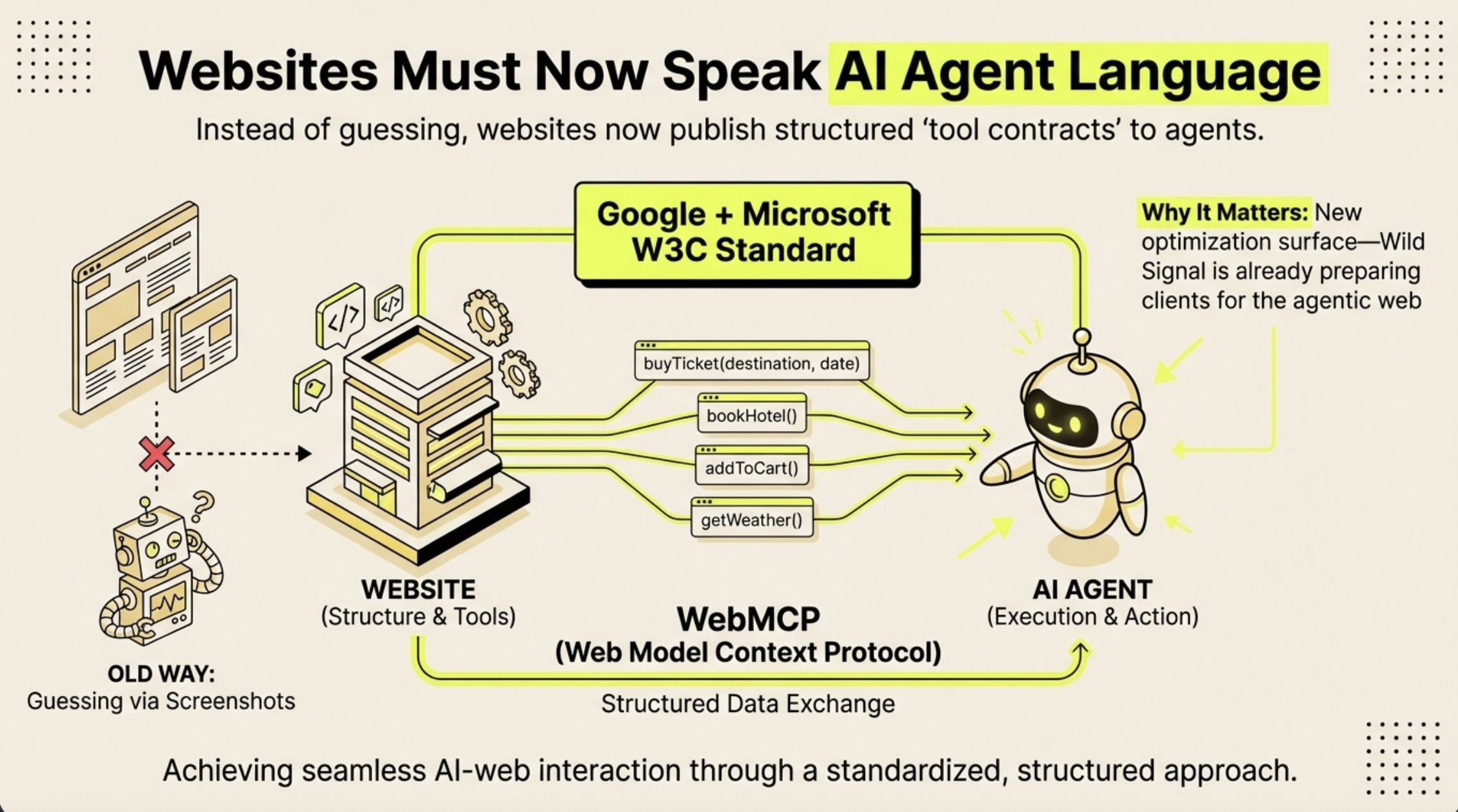
How WebMCP works: websites publish structured tool contracts that AI agents can read and execute directly, replacing the old method of guessing via screenshots. WebMCP is a Google and Microsoft W3C standard for structured data exchange between websites and AI agents.
What Is WebMCP?
WebMCP stands for Web Model Context Protocol. It is a standard introduced by Google that allows websites to communicate directly with AI agents through structured data rather than visual interpretation.
Until now, AI agents that browse the web have worked by taking screenshots, running them through vision models, and trying to locate interactive elements like buttons and forms. If a button moves five pixels, the agent fails. This approach is slow, expensive, and breaks constantly.
WebMCP replaces this with a structured layer. Your website declares its capabilities — what tools exist, what inputs they accept, what they do — and the browser passes this information directly to the AI agent. The site becomes a toolkit that agents can use programmatically, not a picture they have to interpret.
Google is shipping WebMCP in Chrome 146 through the Early Preview Program (EPP). It is not a proposal or a concept paper. The infrastructure is being built right now.
How Does WebMCP Work?
WebMCP provides two integration paths. They are not mutually exclusive — most sites should implement both.
The Declarative Approach (HTML)
The simplest method. You add toolname and tooldescription attributes to your existing `` tags. Chrome reads these attributes and automatically generates a structured schema for AI agents.
This is ideal for contact forms, newsletter signups, search boxes, booking forms, and any other standard form interaction. If you have a form on your site, you can make it agent-accessible in five minutes.
The Imperative Approach (JavaScript)
For anything beyond form submissions, the imperative API gives full programmatic control. You register tools using navigator.modelContext.registerTool(), defining a name, description, input schema, and handler function. This lets AI agents browse your content library, query your product catalog, retrieve company information, or navigate your site — all through structured function calls within the user's existing browser session.
The imperative API also includes provideContext(), which pushes site metadata to the agent proactively, helping it understand where it is and what's available before calling any tools.
Why Does WebMCP Matter for GEO?
GEO (Generative Engine Optimization) has always been about shaping how AI systems understand and represent your brand. Until now, that has primarily meant optimizing content for citation — making sure the right information is structured, authoritative, and findable when AI generates an answer.
WebMCP opens a second optimization surface. It shifts GEO from purely passive (AI talks about you) to active (AI interacts with you).
- Before WebMCP: An AI agent visiting your site sees pixels. It might scrape some text. It has no structured understanding of your forms, products, content library, or capabilities.
- After WebMCP: The moment an AI agent loads your site, it receives a complete manifest of your capabilities. It knows how to contact you, browse your content, check your job listings, and understand your services — instantly and reliably.
For GEO practitioners, this means three things:
- Citation + Capability. Brands with registered tools become actionable, not just referable. AI agents will not just mention you — they will use you.
- Description quality is the new content quality. The natural language descriptions you write for your tools function like content for citation: specific, authoritative descriptions get selected; vague ones get ignored.
- First-mover advantage. Brands that implement WebMCP now define how AI agents learn to interact with their category. If you wait, someone else defines it for you.
How to Implement WebMCP: Step-by-Step
Step 1: Add Declarative Attributes to Your Forms
Find every `` on your site. Add two attributes:
toolname— A machine-readable identifier (e.g.,contact_company,subscribe_newsletter)tooldescription— A natural language explanation of what the form does and when it's relevant
Then ensure every ``, `